Portal
From Destinypedia, the Destiny wiki

The Portal is an activity interface available to players in Destiny 2 which released alongside the The Edge of Fate. Its main purpose is hosting various rewarding activities for different fireteam sizes from across the core game[1], as well as highlighting which of those activities have daily bonus rewards. It also features the main Destination for the current Expansion, buttons to access the Seasonal Hub and the Tower, and the Event Home for any currently active Event. With the release of Monument of Triumph, the portal would be merged with the Director, removing the main screen and adding the Ops categories to the bottom of the director under several different tabs.
Latest Expansion[edit]
The Destination for the latest Expansion is featured in the Portal. For Renegades, this Destination is the Lawless Frontier. The featured Expansion's Destination is not available through the Director. Destinations for Expansions previously featured in the Portal are accessible through the game's Timeline menu, which the Portal has a link to.
Operations[edit]
Each Portal category covers a different kind of Operation, or Op. All activities are scored in certain ways, and PVE activities offer multiple difficulties. Playing on higher difficulties (or performing better in PVP activities) contributes to higher score multipliers, which leads to higher-quality rewards.
Scoring[edit]
 This section is a stub. You can help Destinypedia by expanding it.
Activities are scored in one of three ways:
Eliminations[edit]
Most Fireteam Ops are scored according to the total number of combatants defeated, with more difficult combatants awarding more points upon defeat. Certain combatants, for example Disruptors in missions like Battleground:Conduit, only award points if they are defeated before they can fulfill their purpose.
Objectives[edit]
Solo Ops, Pinnacle Ops, as well as some Fireteam Ops like Savathuns Spire, reward only the completion of the mission objectives, with defeated combatants having no influence on the final reward score. For Fireteam Ops, the objectives consist of the tasks needed to complete the activity. For Solo Ops, which are shorter and usually have only two or three mission tasks, an additional challenge objective is given upon the start of the mission. These objectives require a certain number of combatants to be defeated in a certain way. They most commonly require ability takedowns, percision kills, general weapon kills, or a certain number of enemies to be defeated total. Their completion is possible until the Boss of the Op dies.
Time Bonus[edit]
If a Solo, Fireteam, Arena, or Pinnacle Op is completed below the given time limit, the remaining time is converted into a score bonus and added to the reward score.
Contribution[edit]
Crucible Ops are scored individually for each player, and the score is calculated from the number of eliminated enemies, captured zones if applicable, assists, and friendly players revived.[citation needed]
Multipliers[edit]
At the end of the activity, the accumulated score, including the time bonus[citation needed], is taken and multiplied by all applicable Multipliers.
- The Challenge Multiplier is applied in Solo, Fireteam, Arena, and Pinnacle Ops, and determined by the chosen difficulty. It applies equally to all fireteam members.
- The Reward Multiplier is applied in Solo, Fireteam, Arena, and Pinnacle Ops, and is determined by selected modifiers and a player's highest Power level. It applies individually to each member of the fireteam.
- The Crucible Reward Multiplier is applied in Crucible Ops, and determined by the player's Crucible rank.
- Temporary bonus multipliers are applied according to their description.
Solo Ops[edit]
- Main article: Solo Ops
- "Protect Earth from Sol's greatest foes as a one-Guardian fireteam and the Vanguard's last line of defense."
- — In-game category description
- Fireteam size: 1
- Scoring: Objective-based
- Activity durations: 5-10 minutes
Solo Ops are small in scope, designed for players who may be short on time or perhaps simply do not want to commit to a longer activity. Individual Solo Ops can be launched directly, or at random through the Solo Ops Quickplay playlist.
Fireteam Ops[edit]
- "Team up with fellow Guardians to defend the Last City and reclaim Sol from humanity's adversaries."
- — In-game category description
- Fireteam size: 1-3
- Scoring: Final blows-based
- Activity durations: 10-40+ minutes
Fireteam Ops consist of curated activities from Destiny 2's history of 3-Guardian activities. Individual Fireteam Ops can be launched directly without matchmaking, or at random through the Fireteam Ops Quickplay playlist. The Quickplay playlist and Ops with daily Bonus Focus rewards on Master, Grandmaster, and Ultimate difficulties have matchmaking.
Arena Ops[edit]
- "Join a large group of Lightbearers executing Vanguard operations around Sol and crushing Earth's deadliest foes."
- — In-game category description
- Fireteam size: 1-6
- Scoring: Objective-based
- Activity durations: 10-15 minutes
Arena Ops are curated 6-player activities from Destiny's past Seasons. Individual Arena Ops can be launched directly, or at random through the Arena Ops Quickplay playlist. The Quickplay playlist and all Ops on Master, Grandmaster, and Ultimate difficulties have matchmaking.
Pinnacle Ops[edit]
- "Brave the lairs of humanity's greatest foes to secure Sol for the Vanguard and earn sought-after armaments for the battles to come."
- — In-game category description
- Fireteam size: 1-3
- Scoring: Objective-based
- Activity durations: 10-40+ minutes
Pinnacle Ops are longer on average than Fireteam Ops, and feature a different pool of rewards. Pinnacle Ops can only be launched individually and there are no playlists for any difficulty. The only Pinnacle Ops that feature matchmaking are The Coil, Tomb of Elders, and Onslaught on Midtown and Widow's Court, but only if they have daily Bonus Focus rewards.
Crucible Ops[edit]
- "Hone your skills and win glory in battle against other Guardians."
- — In-game category description
- Fireteam size: 1-6 (mode-dependent)
- Scoring: Performance-based
- Activity duations: 5-10 minutes
Crucible Ops features entirely player-versus-player activities, with its own reward pool separate from Fireteam and Pinnacle Ops. Multiple 6v6 and 3v3 playlists are available, including Trials of Osiris during weekends. Each Crucible Ops playlist is launched individually (though playlists can feature multiple game modes), and every playlist has matchmaking.
Events[edit]
The Portal features a flag for the "Event Home" of any Event that is currently active. The Event Home includes:
- An overview of the Event
- Daily and weekly Event challenges that reward Event Tokens and Event XP.
- An Event Pass with a reward for each Event Rank, earned by gaining Event XP from challenges and activities related to the Event.
- A Play Now section to view and quickly launch any related activities and quests.
- An Event Shop to spend earned Event Tokens.
- A display for the Event's associated Title and its objectives.
- Any extra menus required by the Event. For example, the Solstice's Solstice Forge is accessible through the Event Home, in addition to being available at Eva Levante.
Trivia[edit]
- During development, the Portal tab in the broader Director menu was labeled the Curator.[1]
Gallery[edit]
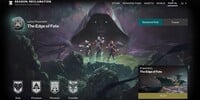 The Portal, as seen with the release of the Edge of Fate
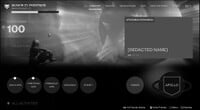 An early mock-up of the Portal


List of Appearances[edit]
- Destiny 2: Reclamation (First appearance)


